Recent decisions by leading AI companies to restrict access to some of their most capable AI models highlight how quickly AI capabilities are advancing.
The real story isn’t that AI can write code faster. It’s that skills once confined to highly specialized security researchers are becoming more accessible, more scalable, and increasingly automated.
For individuals, that means phishing emails that feel more personal, voice clones that sound convincing, deepfake scams, and social engineering attacks tailored to specific targets.
For organizations, it means faster reconnaissance, more effective spear phishing campaigns, automated vulnerability discovery, and attackers operating at a scale that once required large, well funded teams.
The barrier to entry for cybercrime is getting lower. The barrier to effective defense doesn’t have to.
The encouraging reality is that most successful breaches still rely on the same weaknesses attackers have exploited for years:
- Trust
- Urgency
- Poor verification
- Excessive permissions
- Inherited access
Attackers rarely defeat strong encryption. More often, they persuade someone to trust the wrong email, click the wrong link, or approve the wrong request. And increasingly, they aren’t stealing passwords at all. They’re stealing trust, tokens, and permissions.
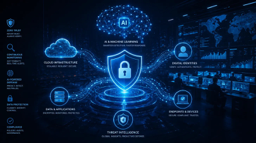
The AI Powered Cybersecurity Era
Let’s look at some of the most common ways personal accounts are compromised today, along with the defenses that make the biggest difference.
1. Phishing and Smishing
Phishing remains one of the most effective attack techniques because it targets people rather than technology. An email or text message appears to come from a trusted company and directs you to a realistic looking login page.
Modern phishing kits can capture passwords and even intercept MFA codes in real time. The victim believes they’re signing into a legitimate service while the attacker immediately uses the captured credentials.
What helps
- Use a password manager
- Enable passkeys where available
- Use hardware security keys for important accounts
- Verify URLs before entering credentials
2. OAuth Attacks: When MFA Isn’t Enough
Permissions Instead of Passwords
One of the least understood attack methods today targets OAuth, the system that lets you sign in to third party apps using your Google, Microsoft, LinkedIn, or GitHub account.
There are two variants, and both bypass MFA entirely.
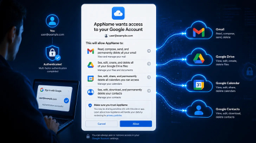
The permission grant attack is the more familiar one. A seemingly legitimate AI tool, browser extension, document viewer, or productivity app asks you to sign in with Google or Microsoft. You enter your password, complete MFA, and click Allow. At that moment, you’ve granted the application direct access to your account. The attacker never needed your credentials. In many cases, changing your password later won’t remove that access, the permission remains active until explicitly revoked.
The authorization code attack is subtler and more dangerous. Here, the attacker doesn’t even need you to approve a malicious app. They direct you to a legitimate OAuth login page e.g. real Microsoft login page, real LinkedIn login page, real GitHub login page. You authenticate normally, including MFA. But after login, the redirect URL in your browser contains a one time authorization code. The attacker asks you to copy and paste that URL back to them. That code is all they need to generate a token and access your account, no password, no MFA, no suspicious permission screen.
This second variant is particularly effective because every step looks legitimate. The login page is real. The MFA prompt is real. Nothing appears wrong until the damage is done.
What helps
- Never copy and paste a URL from your browser immediately after an OAuth login
- Review connected apps regularly and remove permissions you no longer need
- Read permission scopes carefully before clicking Allow
- If a workflow asks you to share a post login URL, treat it as a red flag
3. Session and Token Theft
When you sign in to a service, you’re issued a session token. Think of it as a digital wristband that proves you’ve already authenticated. Malware, malicious browser extensions, and compromised devices can sometimes steal those tokens.
If an attacker obtains a valid token, they may be able to access your account without needing your password or MFA code.
What helps
- Sign out of sessions you no longer use
- Avoid installing untrusted browser extensions
- Keep devices and software patched
- Revoke active sessions after any suspected compromise
4. SIM Swapping
Many services still rely on SMS messages for account recovery. Attackers know this. A criminal convinces a mobile carrier to transfer your phone number to a SIM card they control. Once successful, password reset codes and recovery messages begin arriving on the attacker’s device instead of yours.
What helps
- Set a carrier account PIN
- Enable port-out protection
- Use authenticator apps instead of SMS where possible
- Adopt passkeys for critical accounts
5. Voice Cloning and Deepfakes
Can You Trust What You Hear?

AI has dramatically lowered the effort required to impersonate someone. In some cases, only a few seconds of publicly available audio are needed to generate a convincing voice clone. Attackers use these tools to create urgency, pressure, and emotional manipulation. Parents, grandparents, executives, and employees are all potential targets.
What helps
- Verify requests through a second communication channel
- Create family verification phrases or code words
- Treat urgent requests with healthy skepticism
6. Password Reuse
A breach at a single website can lead to compromises across dozens or even hundreds of accounts. Credential stuffing attacks automatically test leaked username and password combinations against multiple services.
The attack succeeds because it relies on one common behavior: Reusing passwords.
What helps
- Use unique passwords for every account
- Store them in a password manager
- Use passkeys whenever available
Final Thoughts
The technology behind cyberattacks continues to evolve. Human psychology changes far more slowly. Most successful attacks still exploit trust, urgency, and decision making under pressure. That’s why security awareness remains one of the most valuable defenses available to both individuals and organizations.
The goal isn’t paranoia. It’s intentionality. Verify first. Act second.
In the next issue, we’ll move from personal security to organizational security and explore how modern companies are compromised through Business Email Compromise (BEC), MFA fatigue, OAuth abuse, token theft, and social engineering.
Because attackers don’t always break in. More often, they log in.